MCPProxy
A smart proxy for AI agents using the Model Context Protocol (MCP)
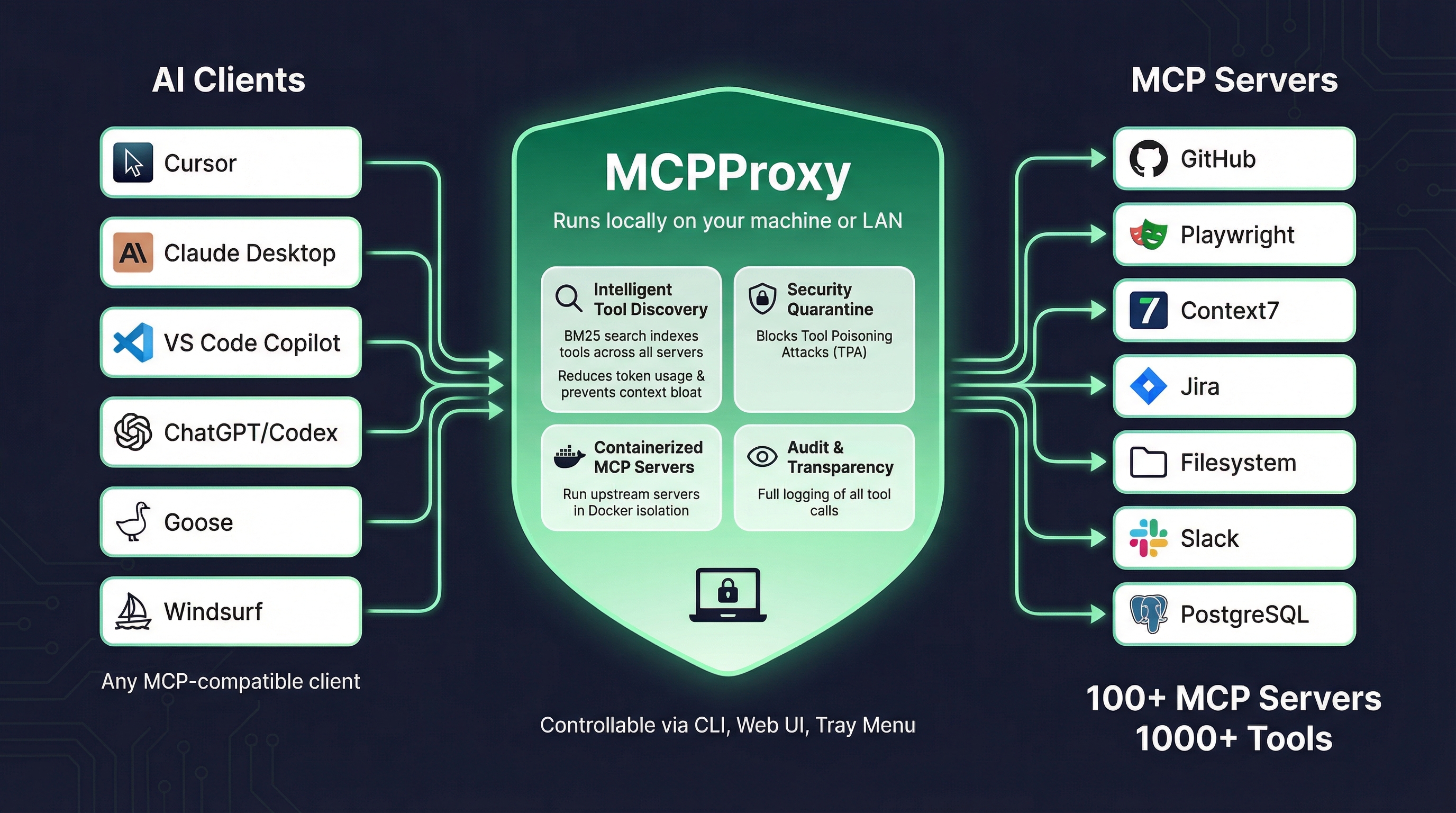
What is MCPProxy?
MCPProxy is a Go-based application that acts as an intelligent proxy between AI clients (like Cursor, Claude Desktop, VS Code Copilot) and MCP servers. It runs locally on your machine or LAN and provides:
- Intelligent Tool Discovery - BM25 search indexes tools across all connected servers, so that, in the default
retrieve_toolsandcode_executionrouting modes, agents load a small set of MCPProxy discovery and execution tools and fetch tool schemas on demand instead of the full upstream catalog (directrouting lists upstream tools individually and does not reduce initial context; savings depend on tool count, routing mode and task) - Security Quarantine - Withholds new servers and tools from agents until you review and approve them, and, under the default
manualtrust mode, holds most later changes to an approved tool's definition for review (known exceptions: input-schema-only edits outsidescanmode, a newly added output schema, and a description added to a tool approved with an empty description;scanandautomodes admit more). This reduces exposure to Tool Poisoning Attacks (TPA); it is not a guarantee of safety (see limits) - Containerized MCP Servers - Run upstream servers in Docker isolation for enhanced security
- Audit & Transparency - Local activity records of tool calls for inspection and debugging, with configurable retention and a response size cap per record (not a compliance certification)
- Sensitive Data Detection - Flags potential API keys, credentials and other sensitive data in tool arguments and responses in the activity log. Optional output sanitisation can redact detected secrets or block critical detections in supported text responses (not in direct routing mode or upstream error results)
Key Features
Intelligent Tool Discovery
Instead of loading all tools from all servers into your AI client's context, MCPProxy indexes tools using BM25 search. Your AI client queries for relevant tools and only receives what it needs, which reduces the tool definitions loaded up front. The saving depends on how many tools you connect, the routing mode and the task; MCPProxy publishes no universal percentage.
Security Quarantine
New MCP servers are automatically quarantined until you review and approve them, and their tools are withheld from agents in the meantime. This reduces exposure to Tool Poisoning Attacks, where a malicious server tries to manipulate AI behavior through crafted tool descriptions. A clean scan is not proof of safety, and trust modes other than manual admit servers or changes without a human review.
Docker Isolation
Run MCP servers inside Docker containers with automatic runtime detection (Python/Node.js), environment variable passing, and proper container lifecycle management.
Multiple Control Interfaces
MCPProxy is controllable via:
- CLI - Full command-line interface for scripting and automation
- Web UI - Browser-based dashboard for visual management
- Tray Menu - System tray application for quick access (macOS/Windows/Linux)
Architecture
MCPProxy consists of two components:
- Core Server (
mcpproxy) - Headless HTTP API server with MCP proxy functionality - Tray Application (
mcpproxy-tray) - Optional GUI that manages the core server
The core server binds to 127.0.0.1:8080 by default (localhost-only for security) and can be configured for LAN access if needed.
Getting Started
Ready to get started? Follow the Installation Guide to install MCPProxy on your system, then proceed to the Quick Start guide to configure your first MCP servers.
Ecosystem
MCPProxy works with any MCP-compatible client and connects to 100+ MCP servers providing 1000+ tools. Popular integrations include:
AI Clients:
- Cursor
- Claude Desktop
- VS Code Copilot
- ChatGPT/Codex
- Goose
- Windsurf
MCP Servers:
- GitHub
- Playwright
- Context7
- Jira
- Filesystem
- Slack
- PostgreSQL
- And many more...